Direct two phones as one camera rig.
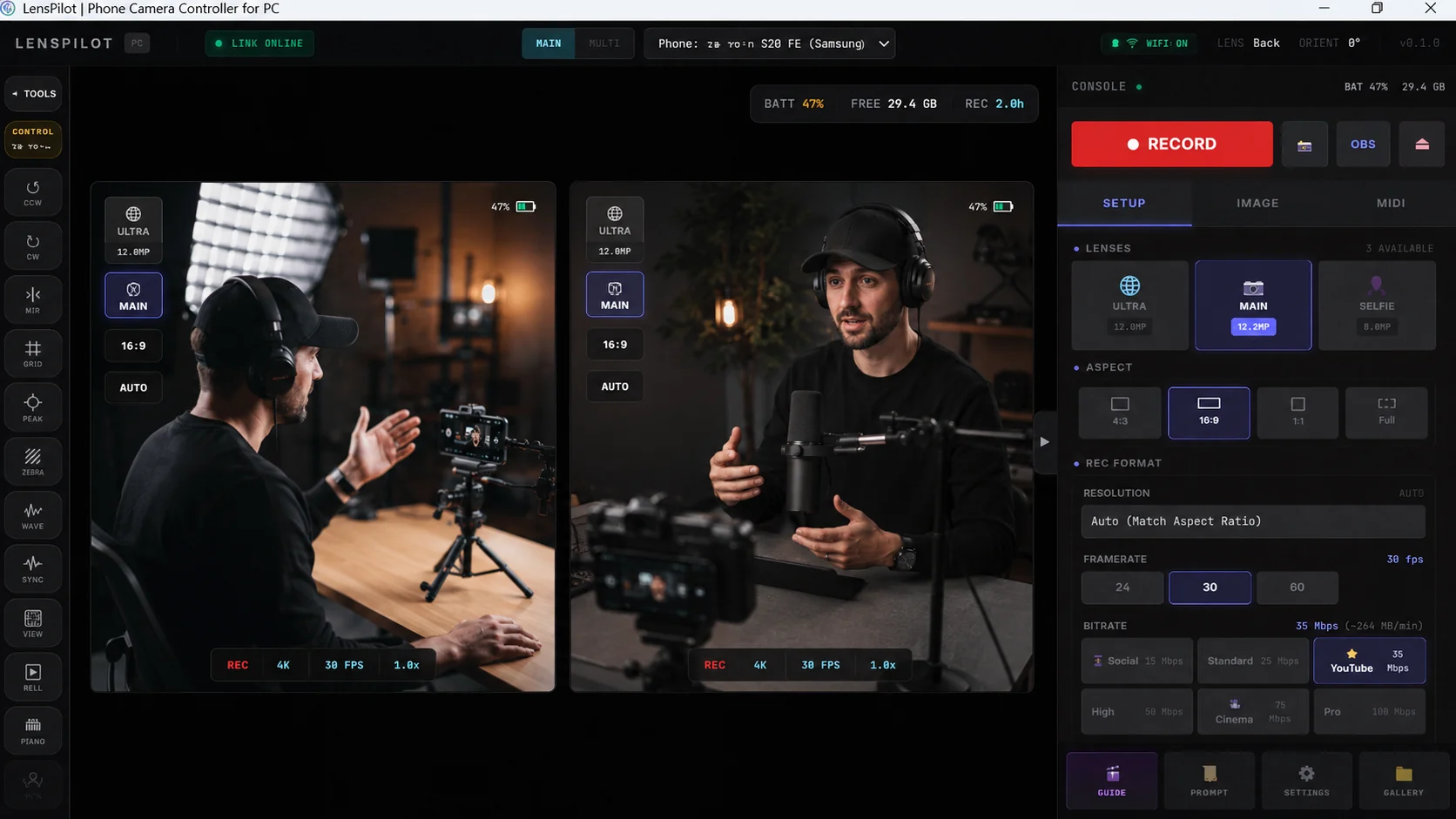
LansPilot turns Android phones into studio cameras you control from Windows. Every angle records locally and lands in sync.
Free account needed to reach the installers.
Sync
Your angles land aligned.
Each phone locks its clock to the desktop while you shoot. On stop, the phone microphones are cross-correlated against your interface recording and the remaining offset is corrected.
Phone A
Phone B
The console
One surface, from the take to the hand-off.
- Direct
- Lens, exposure, white balance and bitrate on both phones, from one panel.
- Prompt
- A teleprompter on your second monitor, or over the phone camera screen itself.
- Caption
- Whisper transcribes on your machine, Hebrew included. No audio is uploaded.
- Edit
- Multi-track timeline, colour page with 3D LUTs, and five export presets.
- Deliver
- FCPXML, EDL and OpenTimelineIO, so the edit continues in Resolve or Premiere.
How we compare
Built for Windows and Android. Priced for creators.
Switcher Studio is a polished live switcher for Apple devices. Camo, DroidCam and Iriun each turn one phone into a great webcam. LansPilot does the part they leave open: directing two Android phones as one synced shoot from your Windows PC, with on-device captions and a clean hand-off to your editor.
| App | Windows PC controlrun production from PC | Android camerasfull camera support | Multi-camsimultaneous | On-device captionsHebrew + English | Editor exportFCPXML · EDL | Price |
|---|---|---|---|---|---|---|
| LansPilotus | 2 synced | Free betaaffordable after | ||||
| Switcher Studio | Up to 9 | From $45 / mobilled annually | ||||
| Camo | Free / Pro$49.99 / yr Pro | |||||
| DroidCam / Iriun | FreeIriun free · DroidCam Pro ~$15 one-time |
What only LansPilot does
Direct it from Windows
Run a synchronized multi-phone shoot from the PC you already own. No Apple device in the loop.
Captions on-device, Hebrew included
Whisper transcribes your recording on your own machine, Hebrew and English. No audio is uploaded.
Hand off to your editor
Export FCPXML or EDL and pick up the edit in DaVinci Resolve or Premiere, angles and sync intact.
Where it stands
What is verified, and what is not.
Public beta. The boundaries as they are in the shipping build.
- Two phones recording in sync, over Wi-Fi or USB.
- Windows 10 and 11, 64-bit. Android 10 or newer.
- Whisper transcription on your machine, with a Hebrew model.
- ASIO and WASAPI capture. Gate, compressor and 3-band EQ per channel.
- FCPXML, EDL and OpenTimelineIO export.
- Three or four phones, depending on CPU, memory and encoder.
- Teleprompter voice-follow. Accuracy varies with mic, language and noise.
- Editor hand-off. Check the project before deleting source media.
- No iPhone camera app and no macOS build.
- Streaming runs through OBS, not inside LansPilot.
- FFmpeg and MPV download on first run rather than ship bundled.
Free while we are in beta.
Windows and Android. No card, no watermark, no upload.
A free account is needed to reach the installers.
Release notes by email